
The hard part of a Country-by-Country Report is rarely the XML file. It is getting every local finance team to send the same ten figures, defined the same way, and adding them up by tax jurisdiction without losing an entity on the way. This Excel workbook covers that step for Table 1 and Table 2.
€39, one-time payment. One price for both files: the Excel workbook and the User Guide (PDF).
Price includes VAT for individuals. Businesses that enter a valid VAT ID at checkout are not charged VAT where the reverse charge applies. Payment, tax invoice and receipt are handled by Stripe (sold through Link).

What is in the workbook
- Setup: group details, reporting currency, average exchange rates and the jurisdiction list (with the ‘Stateless’ line already in place).
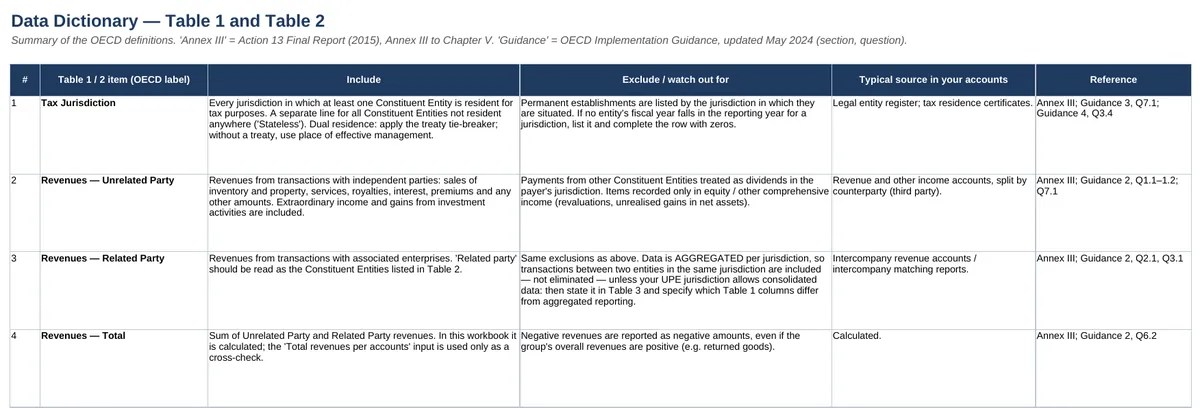
- Data Dictionary: every Table 1 column and the Table 2 fields, with what to include, what to exclude, the usual source in your accounts and the OECD reference (Action 13 Annex III and the Implementation Guidance, section and question).
- Entity Return Form: the data request you send to each subsidiary or permanent establishment, with a short definition next to every field.
- Entities: one row per returned form, in local currency. Grey columns convert to the reporting currency automatically.
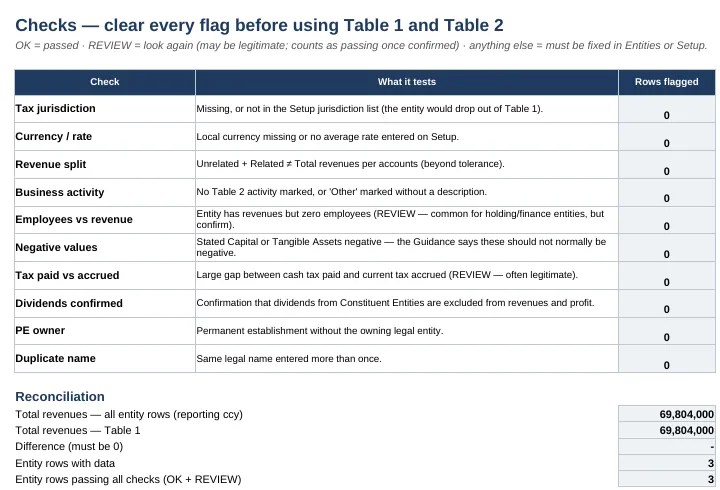
- Checks: ten checks per entity and a reconciliation between entity data and Table 1.
- Table 1 and Table 2: built by formulas, in the OECD layout, ready to transfer to your filing tool or XML solution.
The User Guide (8 pages) explains the workflow, the five choices the OECD leaves to the group and expects you to apply consistently every year, the data points that most often come back wrong, and suggested wording for the Table 3 disclosures.
What the checks catch
An entity whose jurisdiction is spelt differently from the Setup list. A currency with no average rate. Unrelated plus related revenues that do not add up to the total in the accounts. A permanent establishment without its legal entity. The same legal name entered twice. A missing confirmation that dividends from group entities have been excluded, which since fiscal years starting on or after 1 January 2025 also applies to profit before tax.
Some flags are prompts, not errors. A holding company with revenues and no employees, or a large gap between tax paid and tax accrued, shows REVIEW: you confirm it and move on.
What it does not do
- It contains no country-specific deadlines, thresholds, notification rules or penalties. These change and must be checked locally.
- It does not generate the CbC XML file.
- It covers Table 3 only with suggested wording for the disclosures the OECD instructions require.
- It does not decide which entities are Constituent Entities of your group, or how your jurisdiction applies the OECD guidance.
Questions
How do I get the files?
Right after payment you are taken to the download page. Save both files. If you lose access, contact us with your receipt.
How large a group can it handle?
200 entities, 60 jurisdictions and 40 currencies. The User Guide explains how to extend the ranges or split a larger population across copies.
Does it use macros?
No. Standard formulas only, so there is nothing to enable when you open it.
Will I get updates?
Buyers of version 1.0 receive free of charge any error fixes and improvements we make to this version. This does not include updates for changes in OECD guidance, local legislation or any other circumstance.
Is it approved by the OECD or a tax authority?
No. It is an independent preparation aid based on the published OECD texts.
Resale and redistribution of the workbook and the User Guide are prohibited. 0.5% of every purchase goes to permanent carbon removal through Stripe Climate. The workbook is a data-preparation aid, not tax, legal or accounting advice: definitions are summarised from the OECD texts, which prevail together with your local rules.

